

Xiaohongshu (RedNote)
Why You Need It
Xiaohongshu (小红书, also called RedNote) is where 350 million Chinese users share travel recommendations, restaurant picks, and local tips through photos and short videos. It's the most trusted source for discovering what locals actually eat, visit, and recommend — far more useful than traditional tourist guides for finding hidden gems, trendy cafes, and authentic experiences. Since early 2025, an AI translation feature makes it accessible to non-Chinese readers.
Xiaohongshu works best as a discovery and research tool before heading out. Search for a city name or neighbourhood in English and scroll through photo posts — no Chinese reading required for the visual content.
Installation
1. Download Xiaohongshu
Search '小红书' or 'RedNote' or 'Xiaohongshu' in the App Store (iOS) or Google Play (Android). Download before arriving in China.
2. Create an account
Open the app and choose to sign up with your international phone number, WeChat account, Apple ID, or Google account. All options work for foreign users.
3. Select interests during onboarding
When prompted to pick interest categories, choose Travel, Food, and anything else relevant. This trains the algorithm to show you China travel content.
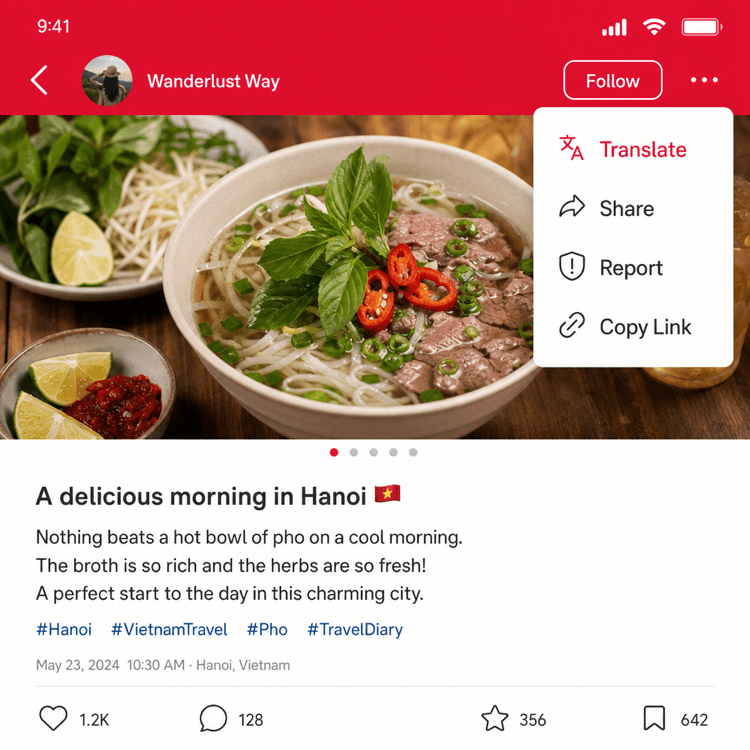
4. Enable AI translation
On any post, tap the three-dot menu (···) at the top right and select Translate. The entire post — captions, comments, and hashtags — translates into English via the built-in AI.
Finding Travel Tips and Restaurants
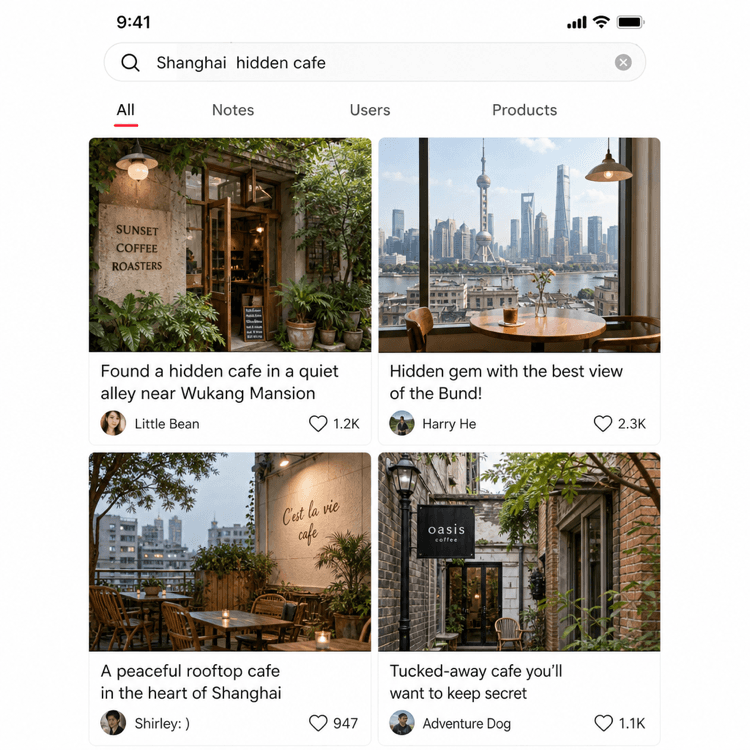
1. Search in English
Tap the search icon and type a city name, neighbourhood, or food type in English — 'Shanghai hidden cafe', 'Beijing hutong food', 'Xi'an night market'. The search engine handles English terms.
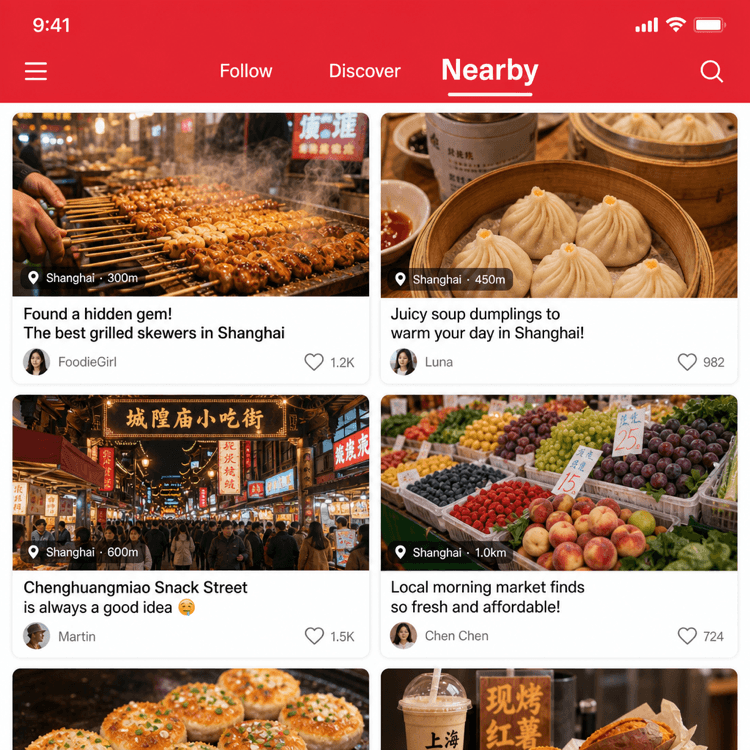
2. Tap the Nearby tab
Switch to the Nearby tab to see location-based posts from users currently around you. Excellent for finding what locals are eating and doing right now.
3. Save posts you like
Tap the bookmark icon on any post to save it to a collection. Build a collection for each city you'll visit before your trip.
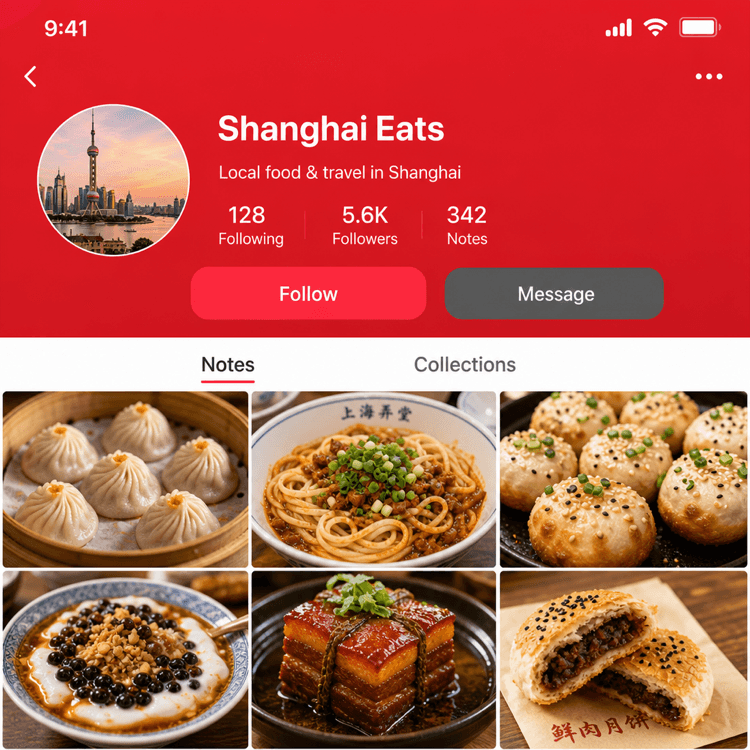
4. Follow local accounts
If a user consistently posts good food or travel content for a city you're visiting, tap Follow to see their future posts in your feed.

Usage Tips
- Use it as a search engine: Many Chinese users now search Xiaohongshu instead of Google or Baidu. Searching a restaurant name often shows more honest reviews than on any Western platform.
- Photo-first content: Even without translation, the photos tell most of the story. A post with 10 photos of a restaurant's dishes tells you exactly what to order.
- Trending hashtags: Search #上海美食 (Shanghai food), #北京打卡 (Beijing check-in), or the English equivalent for city-specific recommendations.
- Avoid sensitive topics: The platform moderates political content strictly. Stick to food, travel, and lifestyle — that's where the value is for tourists anyway.
- Don't share external links: The platform blocks links to outside apps or websites. Save places by screenshot rather than trying to share links.
Troubleshooting
Content is all in Chinese? Tap the three-dot menu (···) on any post → Translate to get an AI English translation of the full post. For browsing, the photos carry most of the useful information even without reading the text.
Search returns irrelevant results? Try adding a city name to your search term, e.g. "成都 hot pot" instead of just "hot pot". More specific searches return more useful posts.
Account registration SMS not arriving? Switch to signing up with Apple ID or Google account — both work reliably for foreign users and bypass the phone verification entirely.
Use Xiaohongshu (RedNote) in real travel situations
Practical guides where this app is part of the solution.
How to Discover Hidden Gems and Travel Tips on Xiaohongshu
Use Xiaohongshu (RedNote) to find local travel tips, hidden spots, and practical advice from Chinese travelers who know the places you're visiting.
Read Guide →How to Find Trendy Restaurants and Cafes on Xiaohongshu
Use Xiaohongshu to discover the most talked-about restaurants and cafes in Chinese cities — find viral spots before they appear on English-language platforms.
Read Guide →How to Set Up a Xiaohongshu Account as a Foreigner
Create a Xiaohongshu account as a foreign tourist — register with your phone number, set up your profile, and start browsing travel and food content.
Read Guide →